Data Refinery Workbench
Welcome to the Kingland Data Refinery Workbench User Guide. This guide documents all the core concepts and feature information for Data Refinery Workbench.
Table of contents
What is Data Refinery Workbench
Data Refinery Workbench is a stand-alone component to the Kingland Data Refinery Platform that provides a simple and flexible way to oversee a Data Management operation. Data Refinery Workbench allows users to remediate data efficiently and effectively. Integrations with the Data Refinery Platform make it easy to identify issues in the Data Refinery Designer (DR Designer), then send those issues from DR Designer to Data Refinery Workbench for remediation. This process would re-analyze the data from the DR Designer to ensure that all issues have been resolved!
Like the DR Designer, Data Refinery Workbench uses a flexible schema, which allows a Data Management Administrator to define the schema for their Entity Records. This schema is used in all updates and Data Record Workflows in the future to ensure data quality remains high.
Data Refinery Workbench is primarily used via the Data Refinery Workbench UI, however external tools can be leveraged using export and update APIs.
Data Refinery Workbench uses a REST API strategy, where each API is documented using an OpenAPI annotation. The OpenAPI specification is hosted on the /swagger/index.html endpoint of the solution. This means it can be rendered in a browser by navigating to https://{host}/swagger/index.html.
For this document, all REST requests will be demonstrated using curl, which is a standard utility available with most Linux distributions. If curl is not available, other free tools such as Bruno can be used instead.
All responses from the Data Refinery Workbench API use application/json. Most of the requests also accept application/json.
Core Concepts
To gain a full understanding of Data Refinery Workbench, it is important to define several core concepts of the application. These include Entity Types, Workflow Definitions, Workflow Instances, Live Data, and User Groups. Read the following sections to learn more about each core concept.
Entity Types
Entity Types allow users to setup a schema for data that will be managed within Data Refinery Workbench. Each Entity Type can contain up to 100 attributes, identify which attributes are required, and identify which attributes are Key attributes from an upstream system.
See the Defining Entity Types page for more details.
Workflow Definitions
When managing data, it’s common to have a business process requiring steps to update, review, and approve data to ensure that quality is achieved. Workflow Definitions allow an Administrator to define and enforce those steps, plus provide a framework to ensure that only the correct User Groups can work on data. This framework can limit User Groups to certain steps where the data is located. Using Workflow Definitions ensures that data changes are reviewed before being saved by creating snapshots of data during the Workflow process.
See the Defining Workflow Definitions page for more details.
Workflow Instances
A Workflow Instance is represented by a single record being worked on each step within a Workflow Definition. Each instance can be assigned to a separate user and can move between Workflow steps independently of other Workflows. Changes made to the data in a Workflow Instance are not saved to the authoritative view of a record until the Workflow has been completed.
Live Data
Live Data is the “live” or current version of data that’s been uploaded to Data Refinery Workbench. As changes are being made to data in a Workflow and uploaded as Live Data, users can see these changes. To find specific Live Data records, a user can search by Entity Type and Attribute Types.
User Groups
To regulate user access to Workflows, User Groups are collections of users who are assigned to Workflow Transitions to manage or refine data. User Groups can be assigned to multiple Workflow Transitions based on the need of the client working in Data Refinery Workbench.
See the Permissions and Groups page for more details.
Example of Using Data Refinery Workbench
Any institution with client services will have client data. For example, banks will keep data on their clients like Account Numbers, First Name, Last Name, Date of Birth, Address, etc. From day to day, month to month, or year to year, changes are always being made to this data. Names change, people move, etc. So, there must be a method that reliably edits, adds, or deletes data from a system. These requests for changes can happen in great volume, which leaves a bank to determine how these records are kept and managed.
A banking institution would like to take this client data and create a new record to keep track of new changes or additions to the data. Using Data Refinery Workbench, Client Banking Data can be imported as Live Data with the intention of completing periodical revalidation Workflows based on the volume of requests to change this data record.
For this example, a Manager may receive these requests for changes that are handled by Analysts and reviewed by other groups. To begin this process, a Manager creates a “Natural Person” Entity Type with attributes like First Name, Last Name, Date of Birth, Address, etc. The Manager can then import current client information into Workbench as Live Data with each client’s information being one Live Data record.
To make regular updates to the Live Data records, the Manager defines a Workflow Definition titled “Natural Persons Management.” Under this definition, Managers can also create Workflows to start the process of refining the data record. This data is then taken from the Live Data and sent through a Workflow under the Natural Persons Management where it goes through the refinement process and is merged to the Live Data.
User Groups are created and assigned to Workflow Transitions in the Workflow Definition. Any users not working in Workbench will need accounts, and users who intend on interacting with the data record will need to be added to User Groups. User Groups can be created by any authorized user with the correct permissions, such as the same Manager that created the Workflow Definition. The groups for this example include an Administrative Group, Analyst Group and Reviewer Group.
If more information is required on how to configure features in Data Refinery Workbench, please reach out to a Customer Service Lead at Kingland for assistance.
Following a Workflow
A client of the bank, Jane Doe, submitted a request to change her last name as she recently got married. She is in the process of changing her last name across all of her accounts to the last name of Smith.
A Manager from the Administrative User Group receives this request and creates a Workflow under the Natural Persons Management Workflow Definition in “Backlog” to be worked on by an Analyst from the Analyst User Group. An Analyst moves this Workflow from “Backlog” to “In Progress.” Upon finding the client and changing the Last Name from Doe to Smith, the Analyst moves the Workflow from “In Progress” to “In Review.”
At this point, a Reviewer Group member will review the change and either move the Workflow to “Approval” or send it to “Blocked.” In this case, a Reviewer may evaluate the request and see that not all paperwork was filled out correctly or the client’s legal name is not yet finalized. If a Reviewer User is not satisfied with the change and the Workflow is moved to “Blocked” a Manager must move the Workflow to “In Progress” or return the Workflow to “Backlog” depending on what needs to be changed. If all the paperwork in the request is permissible, the Reviewer Group can move the Workflow to “Approval.” Because an End Transaction was applied, the remediated Workflow data will replace the Live Data.
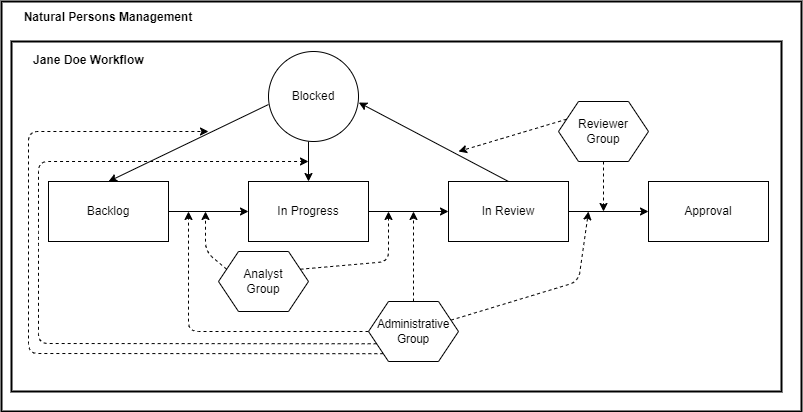
As shown, the Workflow Definition is “Natural Persons Management” which contains the “Jane Doe Workflow” meant for the data change that is followed by the three User Groups.
Help Resources
If this User Guide is incorrect or incomplete, please reach out to a Customer Service Lead at Kingland for assistance.